The publishing orchestration platform

Do more with the same team.

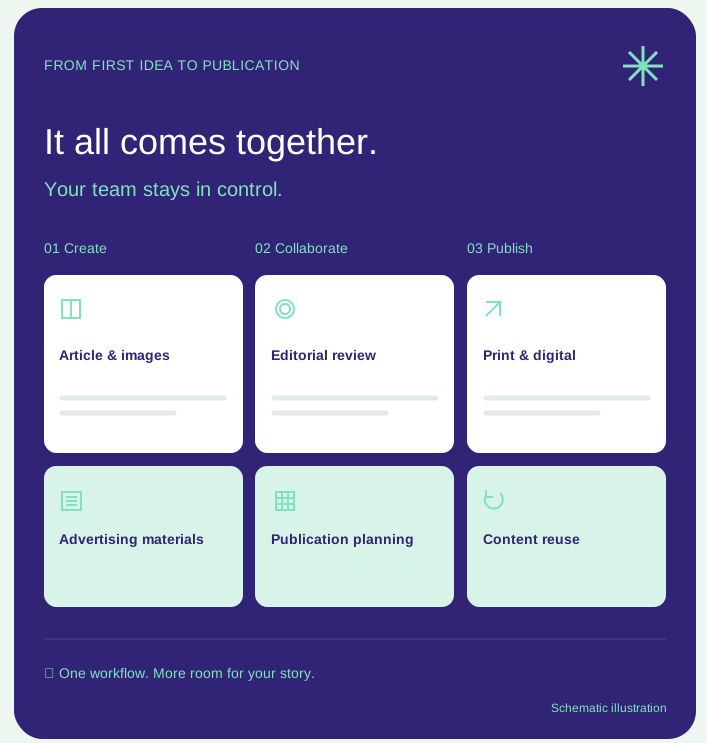
Dockly brings content management, collaboration, advertising, production, AI and multichannel publishing together in one central workflow. Content is captured once, managed centrally, then intelligently enriched, reused and published to any channel you need.

One platform One workflow Full control
Content in one place Word & InDesign
Automation in the workflow AI in the workflow
Built for the publishing process
Publishers Associations Foundations Editorial teams Communications teams
One integrated platform

From separate processes to one central workflow.

Dockly supports the entire publishing process: from ideas, briefings and co-creation to review, planning, production, publication and reuse. Content, advertisements, files, tasks, requests, statuses and versions come together in one platform. This eliminates disconnected systems, duplicate work and unnecessary email exchanges.

01 · ContentFlow | Content

From idea to publication and reuse in one continuous content flow.

Dockly makes content channel-independent and organises every step in one central environment. Ideas, requests, materials, reviews, corrections, statuses and publications stay linked to the same content. Each contribution moves through the process in a controlled way — without disconnected documents, versions or email chains.

Dockly ContentFlow

From the first idea and request to assessment, review, publication and reuse. Each stage flows directly into the next.

One central workflow
01
Ideas & co-creation
  • Ideas
  • Collaborate on content
  • RSS suggestions
  • Source-based drafts
02
Request
  • Briefing & terms
  • Accept or decline
  • Deadline
  • Automatic reminders
03
Submit
  • Upload to Dockly
  • Direct to materials folder
  • Co-creation
  • Upload your own files
04
Assess
  • Completeness check
  • Accept
  • Decline
  • Revision
05
Review
  • Parallel or sequential
  • Peer review
  • Expert panel
  • Corrections & approval
06
Publication
  • Print
  • Digital magazine
  • Website & social media
  • Newsletter
07
Reuse
  • Variation
  • In-depth version
  • Update
  • New audience or channel
ContentFlow ✎ ContentFlow Create & collaborate ↓ ContentDock Manage & reuse ↓ ↗ Publication Print & digital ✓ Article Images Digital magazine Audio Schematic illustration
✓
A continuous view of progress and status

Requests, uploads, acceptances, rejections, revisions, reviews and corrections are recorded centrally. You can immediately see what is complete, what is still missing, which corrections are outstanding and whose turn it is to act. Dockly automatically tracks progress and prompts outstanding actions where needed with tasks, deadlines and reminders.

In reviewReady for designReady to publish
Directly connected to Microsoft Word

Editors keep working in Microsoft Word — the familiar environment where they want to write and edit. From Word content becomes part of the central Dockly workflow, seamlessly connecting writing, review, version control, production and reuse.

Microsoft WordEditor-firstTagged contentReviewVersion controlReuse
✓
Website · Newsletter · Social media · DMX · SPX · APX

Schedule content or publish directly from Dockly to a website, social media, digital magazine, interactive HTML special or audio experience, and reuse the same centrally managed content for newsletters and other channels. Let subscribers or members share content in a controlled way through the Dockly marketing module, organically extending your reach to new, similar audiences and encouraging them to take the actions you want.

DMXSPXAPXEmailWhatsApp
✓
ContentDock

A central content and image library for articles, images, materials, versions, guidelines and metadata. Production progress is also logged, keeping status and history visible and making content readily available for reuse.

Content libraryImage libraryVersionsMetadataReuseProduction progress logging
02 · AdFlow | Advertising

From order to placement in one end-to-end advertising workflow.

Dockly brings orders, material reminders, checks, review, production and placement together in one process. Sales, ad operations, clients and designers always work from the same up-to-date information, eliminating unnecessary downloads, uploads and email exchanges.

Dockly AdFlow

The entire advertising workflow is coordinated and monitored centrally. Each step flows directly into the next.

One advertising workflow
01
Order & placement
  • Edition & format
  • Placement or repeat booking
  • Mailing lists
  • OrderDock
02
Automatic reminders
  • Automatic reminders
  • Submission link
  • Deadline
  • Automatic reminders
03
Check
  • Format & specifications
  • Completeness check
  • Existing materials
  • Ad operations status
04
Review & approval
  • Review the design
  • Corrections
  • Accept / decline
  • Final approval
05
Production
  • AutoAd
  • AutoPage
  • InDesign integration
  • Template for the format
06
Place
  • PDF to production
  • Send to FlatPlan
  • Correct edition & position
  • Ready to publish
✓
Status and progress always in view

Materials, requests, reminders, checks, corrections, reviews and approvals are recorded centrally. You can immediately see which advertisements still need materials, which are in review and which are ready for production or placement.

Requested Submitted In review Approved In production Placed

OrderDock

Manage placements, repeat bookings and mailing lists centrally, linking every order directly to its edition, format, materials and production.

AdFlow

Automates material requests, reminders, checks, review, corrections and approval in one central ad operations workflow.

AutoAd

Automatically processes advertisements and partial-page ads, taking as much repetitive ad operations and production work off your hands as possible.

AutoPage

Independently generates advertising and layout pages based on predefined formats, requirements and templates.

AdFlow AD Advertising materials Ready for review ✓ Order & placement Connected to your publication 1 2 3 4 Request Check Review Place Schematic illustration
03 · FlatPlan | Production board

Visual control over your entire publication.

FlatPlan is more than a production board. It is the live production dashboard for your entire edition — print and digital — bringing together editorial content, advertising, planning, status and production.

Dockly FlatPlan

From structure and planning to production, checks and publication. Everything comes together on one visual production board.

Live production overview
01
Build
  • Edition & sections
  • Regular features
  • Pages
  • Recurring elements
02
Plan
  • Drag & drop
  • Articles
  • Advertising
  • Images & elements
03
Monitor
  • Real-time status
  • Missing materials
  • Outstanding actions
  • Deadlines & roles
04
Produce
05
Check
  • Correction rounds
  • Review & approval
  • Latest version
  • Technical checks
06
Publish
  • Print
  • Digital magazine / DMX
  • Latest corrected version
  • Reusable XML
✓
Everyone works from the same up-to-date plan

Editorial teams, ad operations, designers, publishing managers and external partners see the same edition, positions and progress. From FlatPlan, you can go straight to the underlying article, advertisement, review, briefing or workflow.

Material neededIn progressIn reviewReady for designReady
Directly connected to Adobe InDesign

Designers work entirely in Adobe InDesign — their preferred professional layout environment. An article or book template, or the InDesign file from a previous edition, can be opened directly from the plugin and even prepared to match the required length. For advertisements, the correct advertising template and format are prepared automatically as soon as the order is opened in the plugin. Materials for articles and advertisements can be opened and placed directly through the plugin. Corrections from FlatPlan can be handled directly in Adobe InDesign and editors can write to length if needed. This lets designers work entirely InDesign-first, while Dockly manages workflow, planning, checks and feedback in the background. The finished PDF is then automatically checked for technical issues before going straight back to the production board or into review. From the same FlatPlan, a digital edition can be sent to DMX, coordinating print and digital from one up-to-date production plan.

Adobe InDesign InDesign plugin Layouts & templates Automatic format selection Corrections Write to length Technical checks Review DMX
FlatPlan An edition at a glance ▣ 01 ▣ 02 AD 03 ▣ 04 ▣ 05 AD 06 ▣ 07 ▣ 08 Ready In review Material needed Schematic illustration

Visual production board

Set up the production board automatically and easily plan and move articles, advertisements, regular features and recurring elements with drag & drop.

Live progress

See immediately what is ready, where materials are missing, which elements are still in progress and where action is needed.

Directly linked to the workflow

Open an article, briefing, advertisement, review or underlying workflow straight from the board, without intermediate steps.

Print and digital

Use the same up-to-date plan as the basis for print production and digital publication, including Dockly DMX.

04 · Dockly AI

AI that knows your organisation and works within your workflow.

Dockly AI supports the publishing process exactly where it adds value — from ideas and research to editing, quality checks, discoverability, images and channel-specific versions.

Ideas & research

Identify relevant topics and generate article suggestions from sources such as RSS feeds, your own archives, selected websites and other available resources.

Writing & editing

Draft articles, rewrite text, summarise, add depth to existing content and adapt it to an audience, publication title or format.

Quality & guidelines

Check content for consistency, spelling, style, tone of voice, completeness and agreed editorial guidelines.

SEO, GEO & metadata

Enrich metadata, tags, categories, internal links, alt text and summaries, and generate headlines, snippets and FAQs.

Translation & multichannel

Create translations and channel-specific versions for websites, newsletters, social media, digital specials and other channels from the same source.

Images & illustration

Support image selection, generate new illustrations and adapt existing images with AI, without leaving the central workflow.

Dockly AI ✦ Dockly AI adapts style, word choice and rhythm to the tone of voice set for the publication and editor. You review. You decide. ✦ Edit text ✦ Apply tone of voice ✦ Text to audio Schematic illustration

AI as an intelligent colleague, with editors in control

Dockly AI is context-driven, integrated and workflow-aware. It works with content and archives, style guides, writing rules, editorial guidelines, knowledge sources, taxonomy and metadata, and can be configured for each brand, publication title and editor. Routine work is accelerated, while output can be reviewed, edited and approved within the workflow. Editorial judgement, quality and final approval remain firmly with the editorial team.

Dockly AI
Context-driven Integrated Workflow-aware Brand-specific Publication-specific Editor-specific Style guides Writing rules Editorial guidelines Review & approval Human oversight
DockConnect · integrations

Familiar tools. A connected workflow.

Bring Word documents into your content process, work with InDesign files and connect your CRM or social planning. Dockly fits the tools in your publishing process.

Dockly
DockConnect Connects tools to the central Dockly workflow

Microsoft Word

Documents to content

Adobe InDesign

Files for page layout

Zeno CRM

Contacts and order data

Hootsuite

Social publishing

WordPress

Website & content

Drupal

Website & content

Mautic

Marketing automation

MailChimp

Email marketing

One central workflow, connected to the tools you already use.
What it brings

Less administration. More reach.

Dockly shifts the focus from separate tasks and individual publications to smarter content orchestration. Information is captured properly once, then managed, enriched and made available to every channel you need.

01

Less searching & copying

All content and files available centrally, always in their latest version.

02

Fewer scattered conversations

Briefings, feedback, reviews and statuses stay connected to the workflow.

03

Less duplicate work

Create content once and use the same source across multiple channels.

04

More automation

From AI and ad operations to production planning and digital publication.

05

More clarity

One central coordination environment for editorial work, advertising, planning and progress.

06

More from existing content

Extend the lifespan, reach and commercial value of content with digital specials, themed collections, audio, shareable articles and new sponsorship or advertising opportunities.

Ready for the next step?

Organise content more intelligently. Reach further.

Dockly helps publishers, associations and foundations manage more content, serve more channels and use AI responsibly with the same team — without losing sight of quality, clarity or established ways of working. Dockly makes it possible to automate as much unnecessary, repetitive manual work as possible, creating more room for the work where people truly add value.

Let’s get acquainted →